


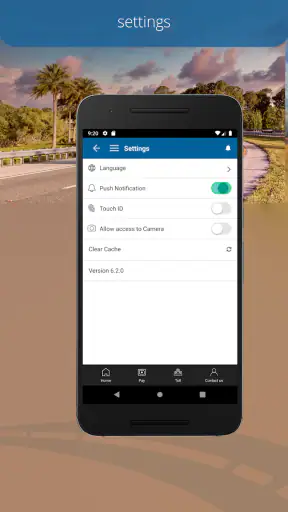
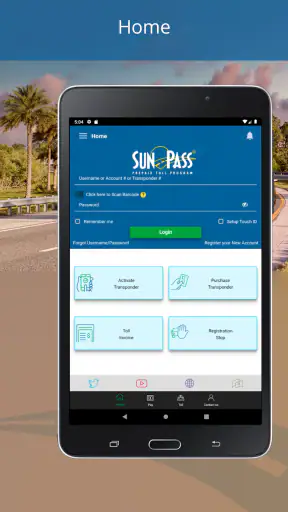
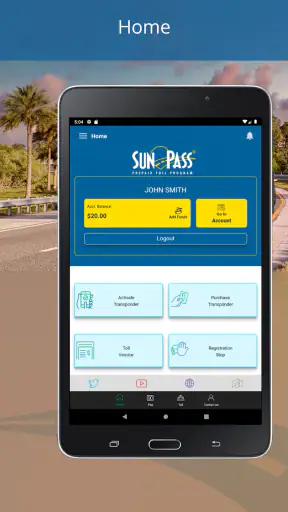
Driving through Florida can turn a simple trip into a small administrative task. Tolls appear along the route, payment needs to be ready, and stopping to deal with cash is rarely convenient. I reviewed SunPass as the tool for that starting point: a free Travel & Local app from Florida's Turnpike Enterprise that helps drivers manage Florida’s prepaid toll program from a phone.
My overall impression is practical rather than exciting. This is not an app I open for entertainment or trip inspiration. I use it when I want fewer surprises around toll travel, and its value depends heavily on whether I regularly drive in Florida. For the right driver, it can bring toll-related tasks into one place. For someone who only visits occasionally, the setup and account management may feel like more work than expected.
The app has been available since February 9, 2016, and its current version is 6.5.17. It is free, rated for Everyone, and works on devices running OS 9 or newer. Its average rating is 3.5 from around 17 thousand ratings, with roughly 7 thousand written reviews and over 1 million installs. Those figures suggest a well-known service with a mixed everyday experience, which matches my view: useful when it fits your driving routine, but not completely frictionless.
From an upcoming drive to a ready toll account
Starting with the real problem
The best reason to install SunPass is not curiosity; it is an upcoming or recurring drive that includes Florida toll roads. I would start by deciding whether I need an ongoing prepaid toll account or simply want a way to handle one occasional journey. That distinction matters. A commuter, local driver, or frequent visitor can benefit from having a dedicated account. A traveler renting a car for a short holiday may prefer to understand the rental company’s toll arrangement before creating anything.
That is the first useful handoff in the workflow: the driver has to connect the app with the actual vehicle and travel situation. SunPass is not a general navigation replacement. It does not take the place of a maps app for choosing restaurants, finding attractions, or building a sightseeing route. I would use navigation software to plan the road, then use SunPass for the toll-account side of that trip.
Because the program is prepaid, I would also treat the account as a balance-management task rather than a one-time digital wallet. Before leaving, I would check that the account is active, that the vehicle information is correct, and that the available balance makes sense for the drive. These checks are more important than simply having the app installed. An app on the phone does not automatically mean the toll side of the journey is ready.
Setting up before the wheels move
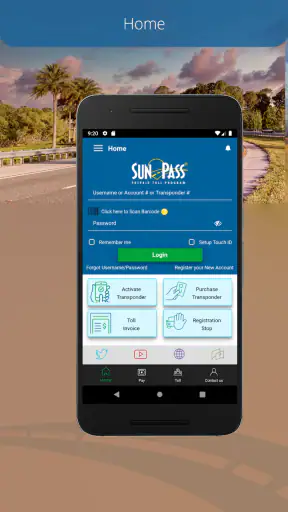
My preferred workflow is to do the administrative work while parked at home. I would install the app, sign in or create the required account, and carefully enter the details requested for the vehicle and payment method. The exact screen order can change between releases, so I would follow the labels shown in version 6.5.17 rather than relying on an old tutorial.
This is one of the less obvious lessons from using a toll app: accuracy matters more than speed during setup. A small mistake in a plate detail, vehicle selection, or account entry can create confusion later, especially when the driver assumes the account is already connected to the correct car. I would review every vehicle-related field before starting a long trip, particularly if the household has more than one car or if a vehicle has recently changed.
I would also avoid making the first setup immediately before entering a toll lane. That creates unnecessary pressure and makes it harder to notice a wrong entry. SunPass is much more useful as a preparation tool than as a last-second rescue tool. The app can organize the account side of the journey, but the driver still has to provide correct information and make sensible checks.
Checking the account before the trip
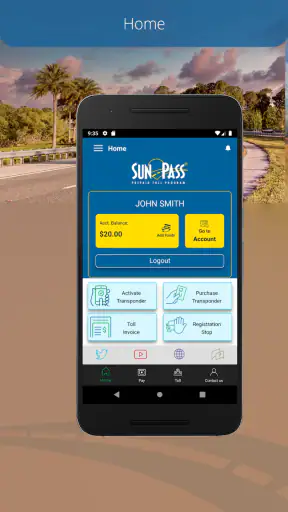
Once the account is ready, I would use the app as a pre-drive checklist. I would look at the current balance, confirm that the selected vehicle is the one I am taking, and make sure the payment details are still usable. I would do this again after a long period without driving, not because the app is complicated, but because toll travel is easy to overlook until the charge matters.
For a family sharing one account, this check becomes a handoff between the person managing the account and the person driving. The account manager may be sitting at home, while another family member is on the road. In that situation, I would agree in advance who is responsible for checking the balance and vehicle information. That simple division of responsibility avoids the common problem where everyone assumes somebody else has handled it.
For a work vehicle, the same issue appears in a different form. The driver may know the route, while an office administrator controls the payment details. SunPass can be part of that workflow, but it does not remove the need for communication. I would not assume that installing the app on a driver’s phone gives that person complete control over the account or solves record-keeping for a business.
Using it during an ordinary drive
During the actual drive, I would keep the phone interaction to a minimum. The useful work should already be finished. I would not try to navigate account screens while moving, and I would not treat the app as a substitute for paying attention to road signs, lane markings, or changing traffic conditions.
A realistic example is a weekend drive from one Florida city to another. The night before, I check the account and vehicle details, then leave the phone alone once I start driving. If the trip uses toll roads, the prepaid account handles the toll-program side while my navigation app handles directions. After arriving, I can review the account rather than stopping somewhere to sort out a roadside payment issue.
That separation is important. SunPass is valuable because it supports the background transaction process, not because it gives the driver a new reason to interact with a screen. I see it as a preparation-and-review app: prepare before departure, drive without fiddling, and review afterward if something needs attention.
Reviewing what happened afterward
After the trip, I would return to the app to check the account activity and remaining balance. This is especially useful when several people use the same vehicle or when a route included multiple toll points. A quick review gives the account holder a chance to notice an unexpected charge or a balance that needs attention before the next journey.
This post-trip step also creates a clean handoff for shared driving. If I borrowed a family car, I could tell the account holder that the trip is complete. If I manage the account for someone else, I could use the activity view as a starting point for explaining what changed. I would still keep any important travel or expense records in the system my household or employer normally uses, because a toll app is not automatically a full accounting platform.
The result is a calmer toll routine, but not a completely automatic travel experience. SunPass reduces one category of roadside uncertainty. It does not plan the route, predict every driving delay, or make vehicle and payment details correct on the user’s behalf.
Where the workflow feels strongest
The strongest part of SunPass is the connection between a Florida toll journey and a dedicated prepaid account. Instead of treating each toll encounter as an isolated payment problem, I can prepare once and then use the account across regular drives. That makes the app particularly sensible for local drivers, commuters, frequent visitors, and households that use Florida toll roads often.
I also like the fact that the app is free to download and aimed at Everyone. There is no entertainment layer or unnecessary travel content competing with the main task. The focus stays on account access and toll-related management. For a driver who already knows why they need the program, that directness is a strength.
Another practical advantage is that the phone becomes a convenient place to check the account away from a desktop computer. I can review the situation before leaving work, while parked at a hotel, or after arriving at home. That does not eliminate the need for careful setup, but it makes routine checks easier to fit into a normal day.
Where the handoffs create friction
The app’s usefulness depends on several handoffs that are easy to underestimate. The driver hands vehicle information to the account, the account hands payment information to the toll program, and the app hands status information back to the person responsible for the balance. If any part of that chain is outdated, the phone interface cannot fix the underlying mismatch.
Shared cars are a good example. One person may install the app, another may drive, and a third may own the payment method. Before a trip, I would make sure everyone agrees on which account and vehicle are being used. I would also avoid creating duplicate accounts simply because different family members want to check the same information. A little planning here is more effective than trying to sort out ownership during a trip.
Rental cars are another point where I would slow down. The rental company may have its own toll process, and adding a temporary vehicle to a personal toll account without understanding that arrangement could make the situation harder to follow. For a short rental, I would first read the rental agreement and ask the company how tolls are handled. SunPass is a better fit when I control the account and vehicle relationship, not when a third party already manages those details.
There is also a difference between account access and instant roadside support. If something looks wrong while I am traveling, I would pull over safely before investigating. I would not expect the app alone to explain every possible toll dispute or vehicle issue in a few taps. The more unusual the problem, the more likely I would need to use the program’s official support channels rather than repeatedly refreshing the app.
Comparing it with the usual alternatives
Compared with paying tolls through cash-based methods, SunPass offers a more organized digital workflow. I do not need to plan around finding the right change, and I can check the account before and after a trip. That is the clearest reason I would recommend it to a regular Florida driver.
Compared with a bank card or a general mobile wallet, the dedicated toll account has a narrower purpose. A normal payment app is convenient for shops and services, but it does not necessarily provide the same toll-program context, vehicle relationship, or balance view. If my priority is managing Florida toll travel rather than making general payments, SunPass is the more relevant tool.
Compared with a navigation app, the products solve different problems. Navigation helps me decide where to go and how to get there. SunPass helps me prepare for the toll-account side of the road journey. I would not replace one with the other; I would use each for its proper job.
Compared with relying entirely on a rental company, the choice depends on who controls the vehicle. A personal SunPass account makes more sense for my own car and repeated travel. A rental company’s process may be simpler for a short visit, even if it feels less familiar. The cheaper-looking or more convenient option is not always the one with the clearest responsibility, so I would compare the full arrangement before driving.
Who should use it and who should skip it
I would recommend SunPass to anyone who drives Florida toll roads regularly and wants a phone-based way to manage a prepaid toll account. It is also a reasonable choice for households that need to check the same account before different people use the car. The app’s large install base shows that it serves a substantial audience, but popularity alone is not a reason for every traveler to install it.
I would be more cautious if I were visiting Florida once, renting a car, or driving a route where tolls are unlikely. In those cases, the rental company’s instructions or a route-planning decision may be enough. I would also skip it if I wanted a full travel companion with hotel bookings, attraction discovery, public transit planning, or turn-by-turn directions. That is outside this app’s focused role.
Drivers who dislike managing prepaid balances may find the workflow annoying. The benefit comes from checking details before travel and keeping the account current. If I know I will never remember to review the balance or update a vehicle, I would choose the simplest arrangement available for my specific trip rather than assuming the app will manage everything automatically.
My practical routine for avoiding surprises
My routine would be simple: set up the account while parked, verify the vehicle, review the balance, and check again after the trip. I would make those checks part of packing rather than part of driving. For a shared vehicle, I would tell the other driver which account is being used and who will handle any follow-up.
I would also keep a clear boundary between the app and navigation. Before departure, I would plan the route elsewhere and then use SunPass only for toll-account preparation. If I needed to change a vehicle or payment detail, I would do it with enough time to review the result, not in a queue of traffic.
Finally, I would treat the app’s rating of 3.5 as a useful reminder to keep expectations realistic. It is a functional service app, not a polished travel dashboard that removes every possible complication. My experience is that its value comes from disciplined use: correct setup, sensible checks, and clear responsibility between the account holder and the driver.
The outcome after the trip
When the workflow goes well, the outcome is modest but worthwhile: I can complete a Florida toll-road journey without making toll payment the main event of the drive, then return to the app when I need to check the account. That is enough to make SunPass a useful companion for regular local travel.
My recommendation is to use SunPass when you need an ongoing Florida toll-account workflow, not simply because you are taking a single trip. It works best when the vehicle, payment method, and account responsibility are clear. If those pieces belong to a rental company or another service, that alternative may be cleaner.
For my own driving, I would keep it installed if I were using Florida toll roads repeatedly. The app is free, focused, and practical, with the main weaknesses coming from setup responsibility and the occasional friction of shared vehicles or temporary rentals. Used before and after the journey rather than while driving, it does what I need: it turns toll management into a routine check instead of a last-minute roadside problem.


